Shopify profit tracking to grow your margin
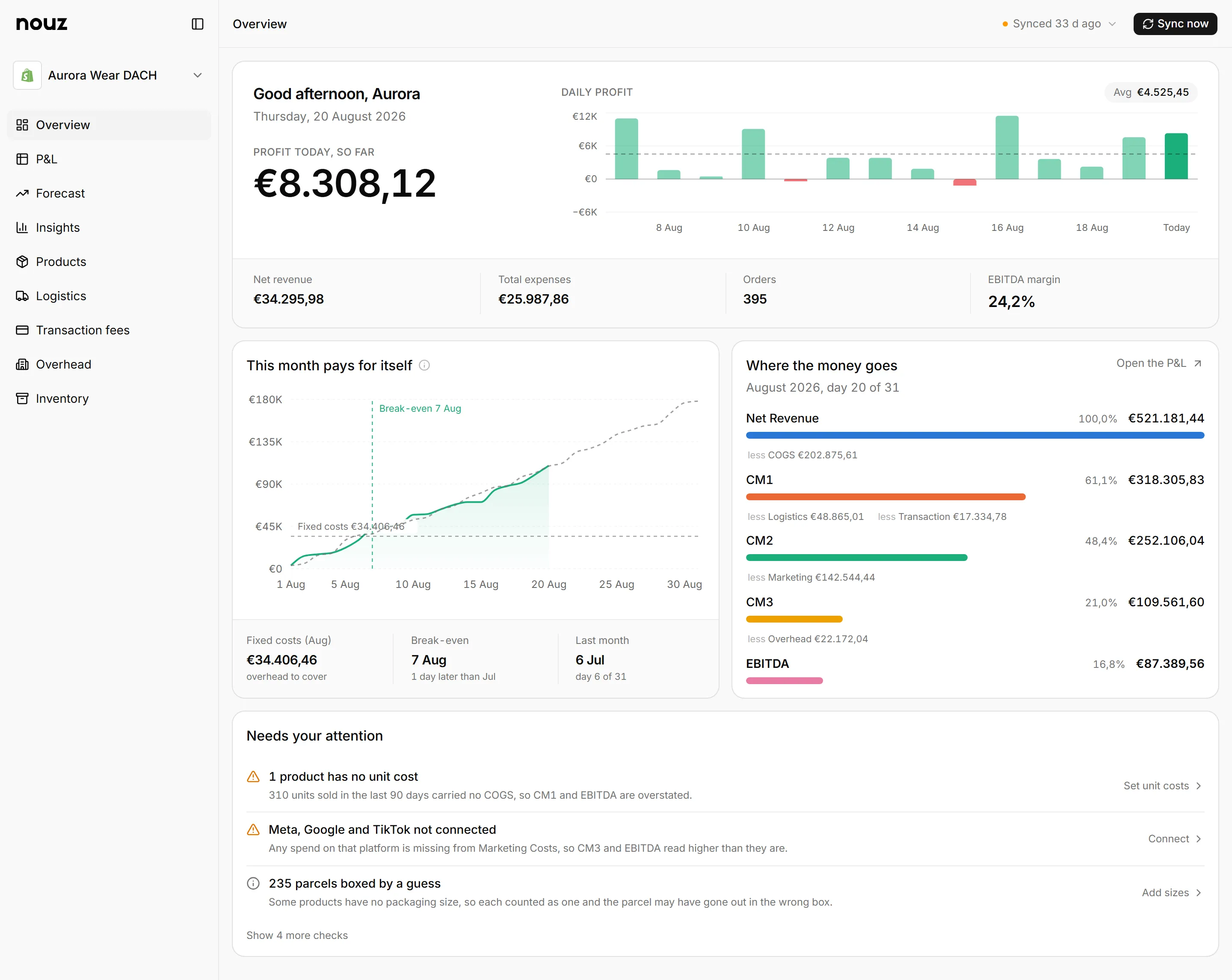
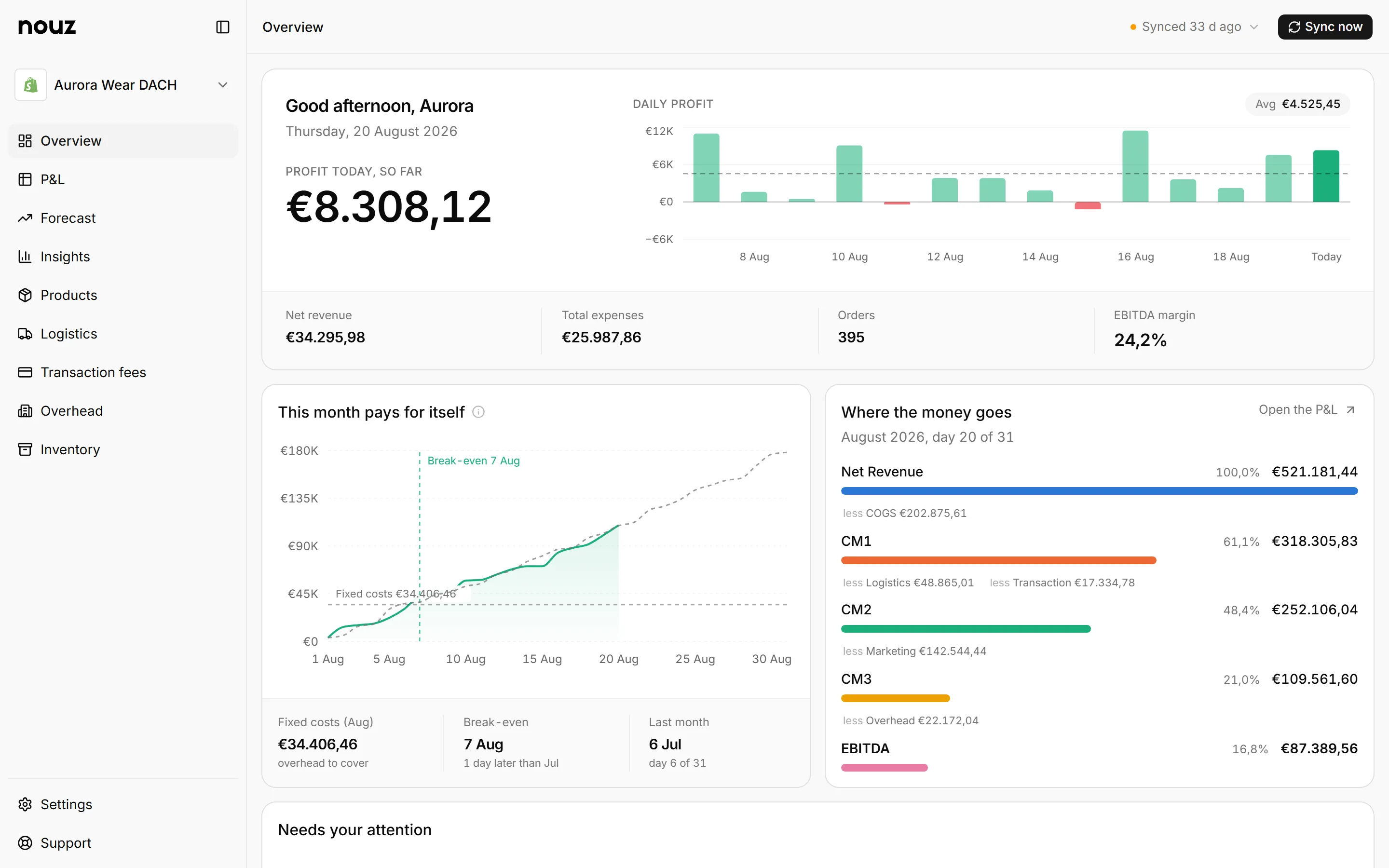
Price every order with your real costs, see the margin behind every product, and know exactly how much profit you made today, from your first order to your hundred-thousandth.
- Shopify
- Meta
- TikTok

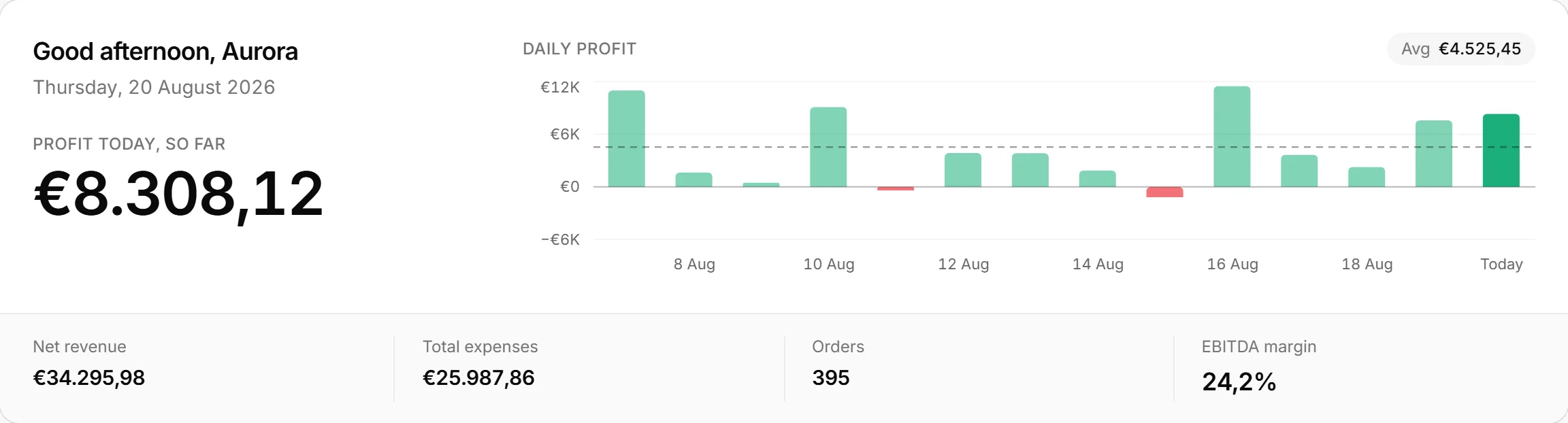
One number, and everything underneath it.
A full profit and loss statement, every day that went into it, the four cost engines that price it, and the margin behind every product you sell.
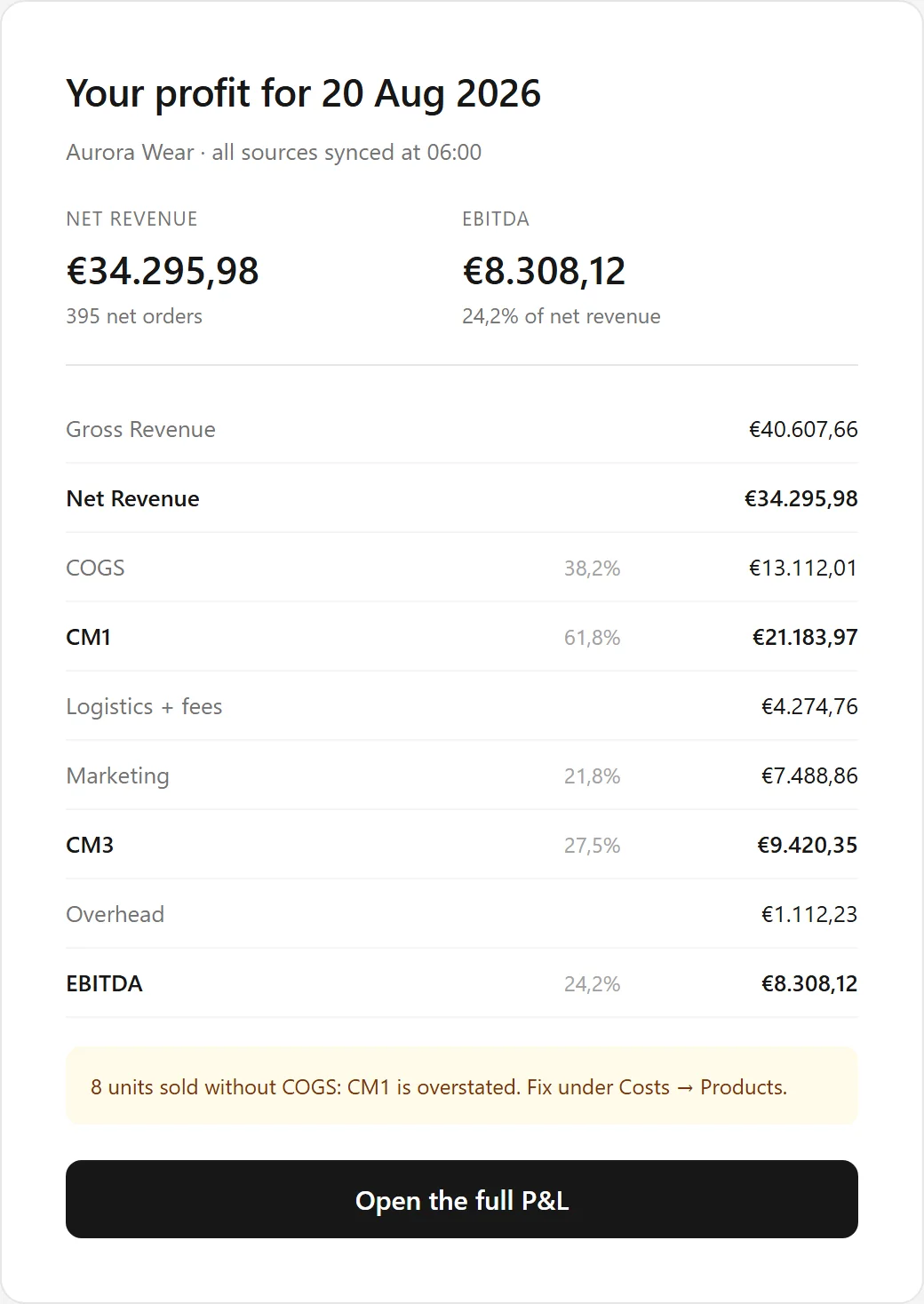
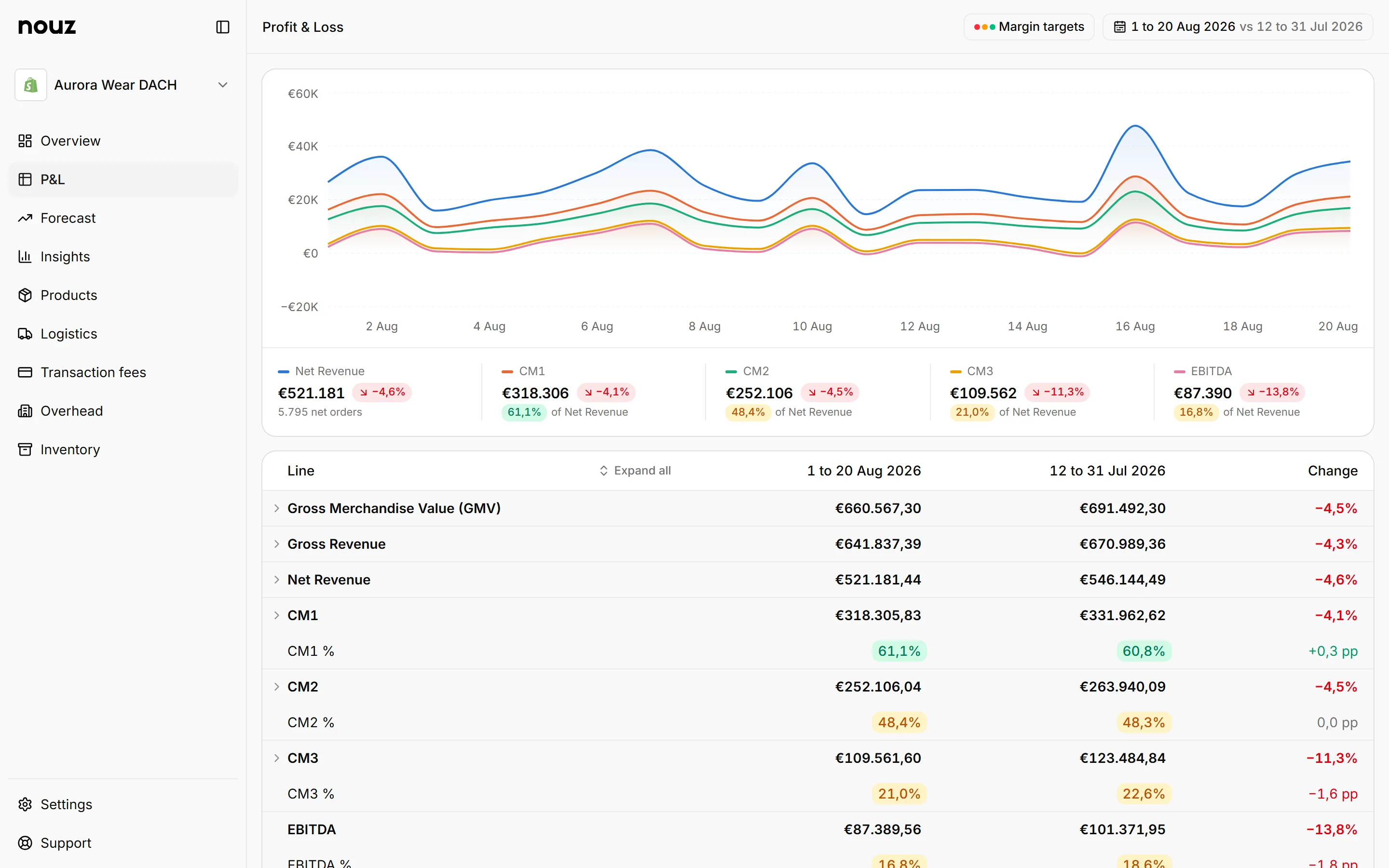
A real profit and loss statement, from revenue down to what you kept
34 linesEvery line sits against the same period last month, so a number that moved says so before you go looking for it.

Four margins, not one number
This monthCM1 after the goods, CM2 after fulfilment and fees, CM3 after advertising, EBITDA after the fixed bills.

Priced with your costs, at your rates
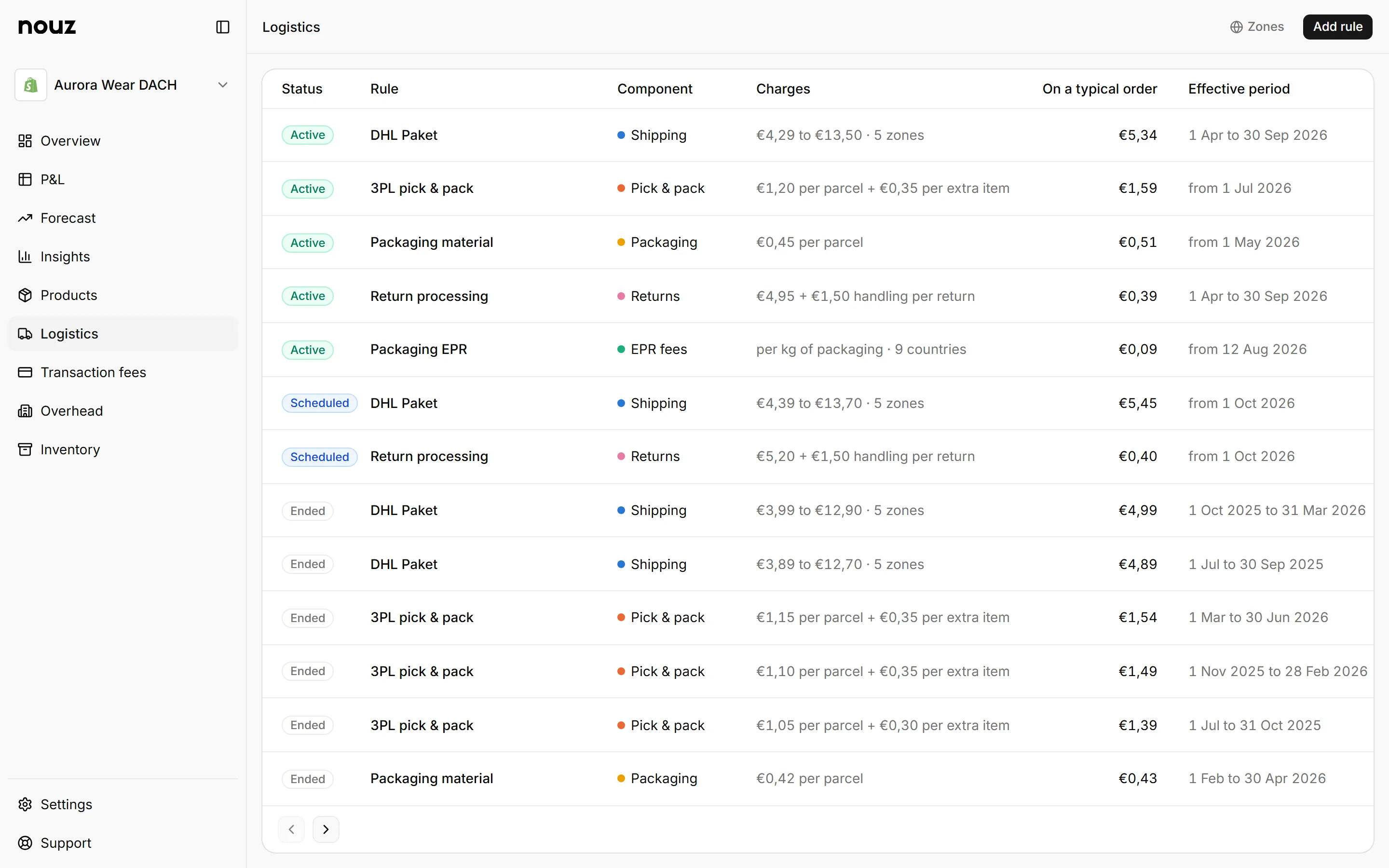
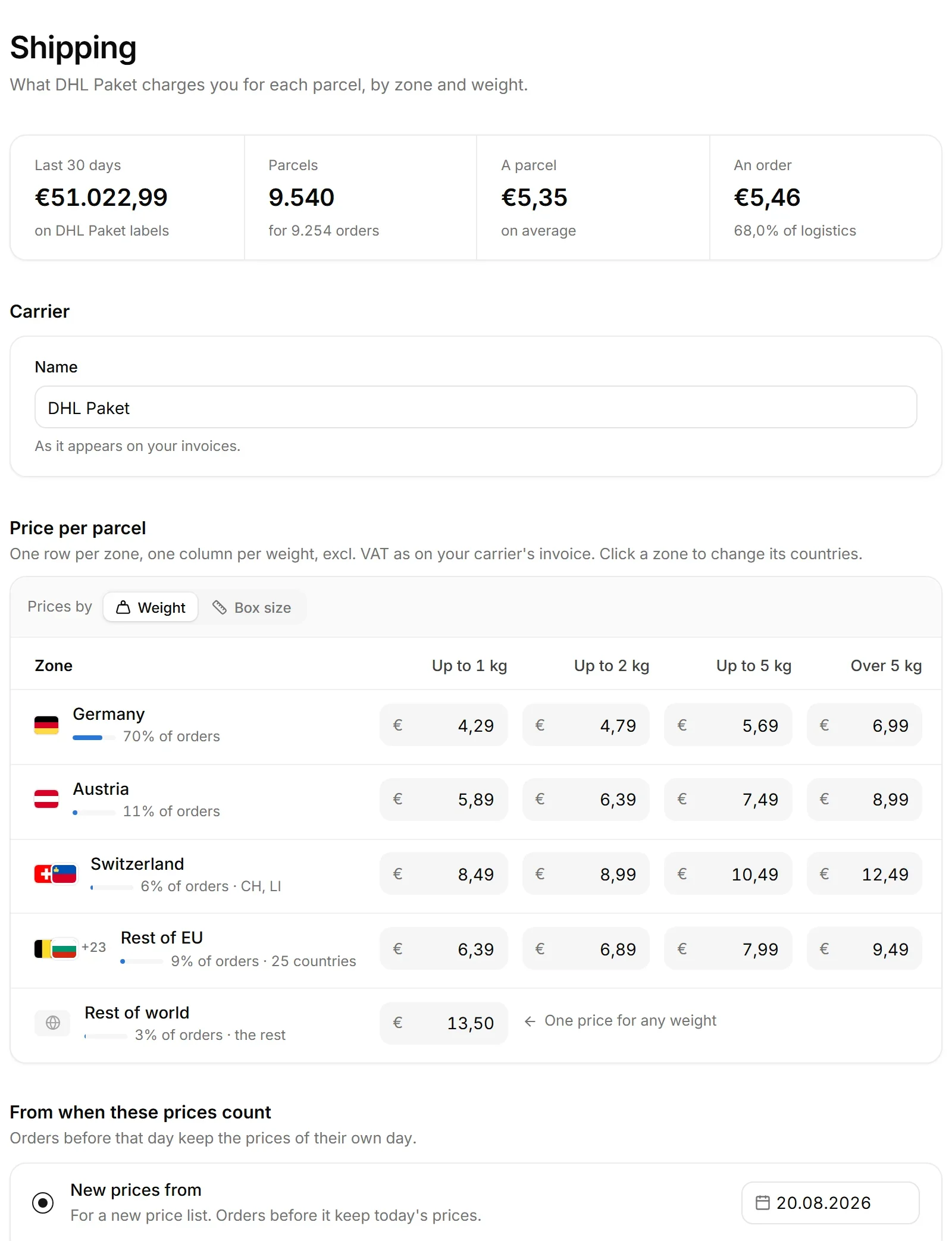
4 enginesYour carrier's rates by zone and weight, picking, packing, packaging and returns, applied to every parcel.

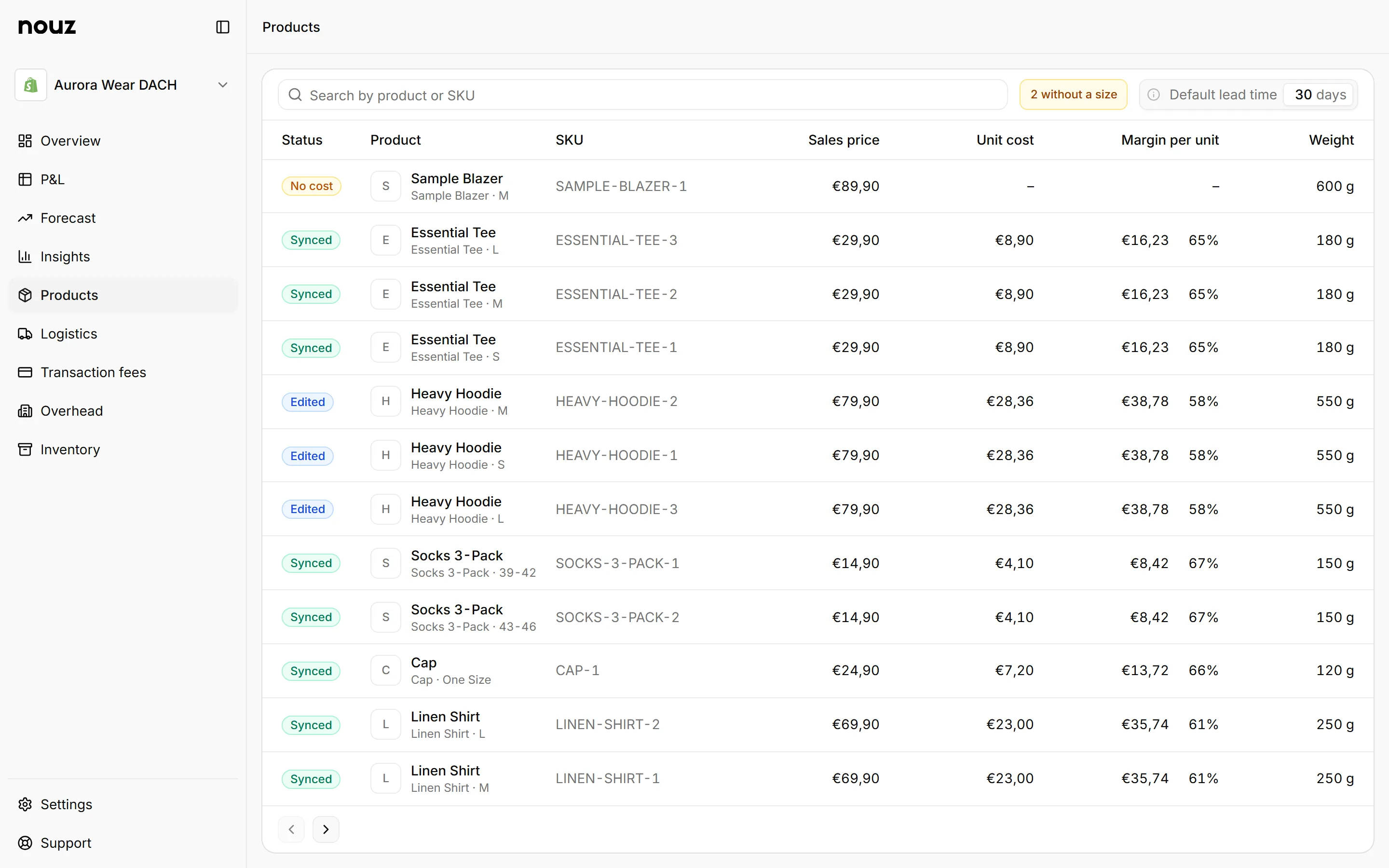
Profit per product, not revenue per product
Per SKUEach product's own discounts, returns, weight and cost of goods. The two rankings are not the same list.

A gap is named, never quietly guessed
Data healthAn unpriced product is reported as unpriced. Nothing missing is ever counted as zero.

How it works
Set it up once. Then read it every morning.
- 01
Connect everything
Your Shopify store, then Meta, Google and TikTok. Read-only, one click each, and the first sync brings your entire order history.
- 02
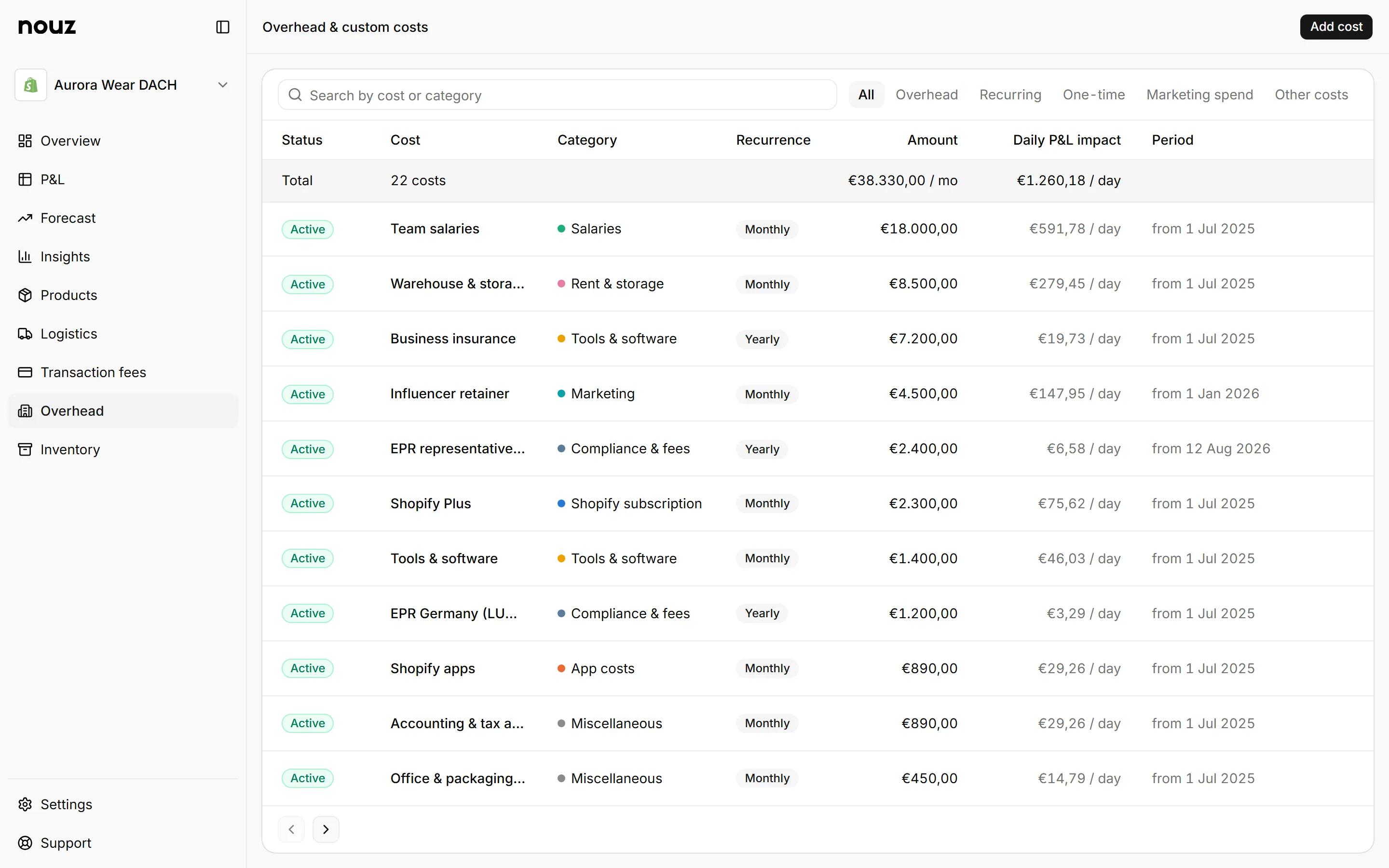
Set your overhead
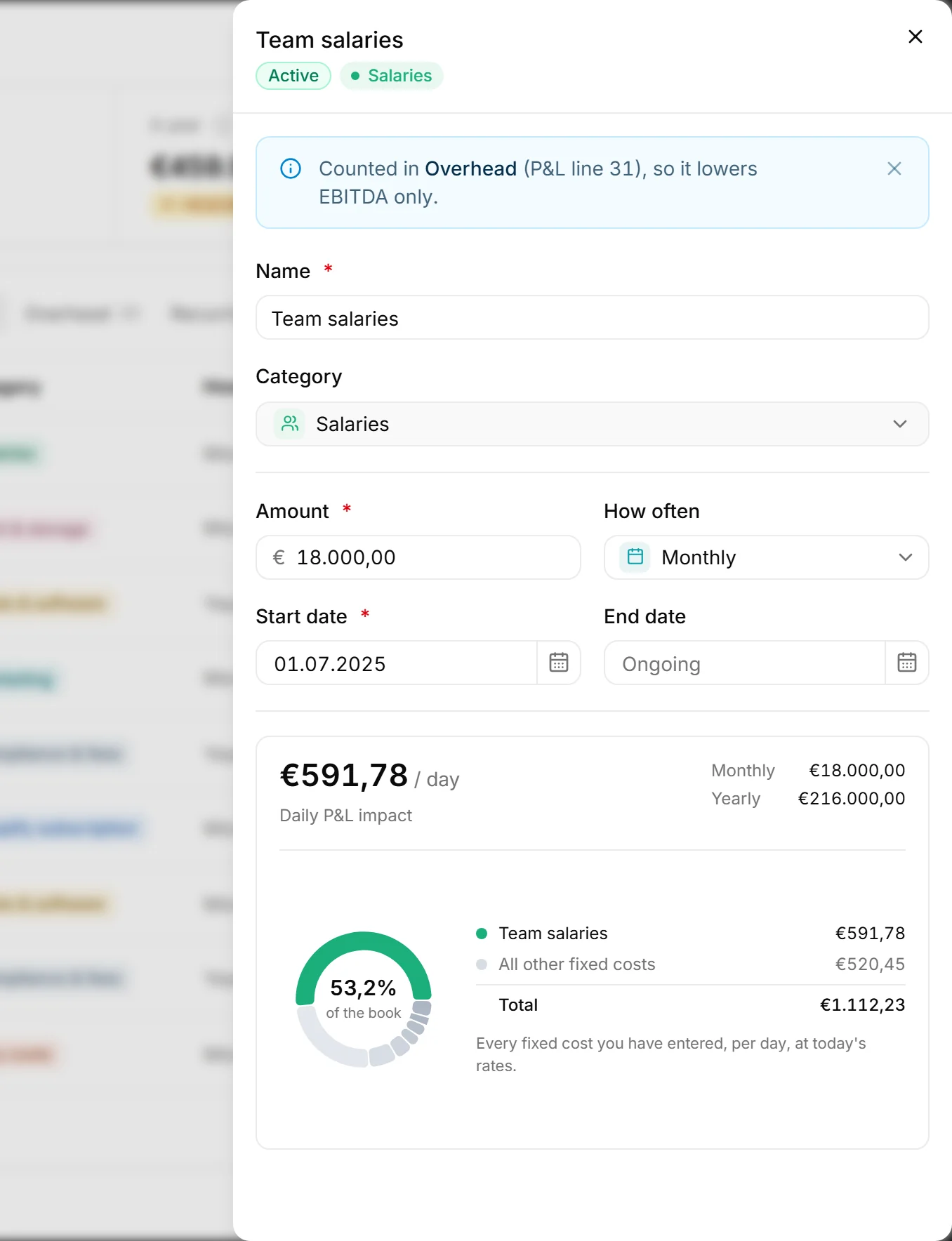
Rent, salaries, software, agencies. Every cost is spread across the days it pays for rather than dropped whole onto the day the invoice cleared.
- 03
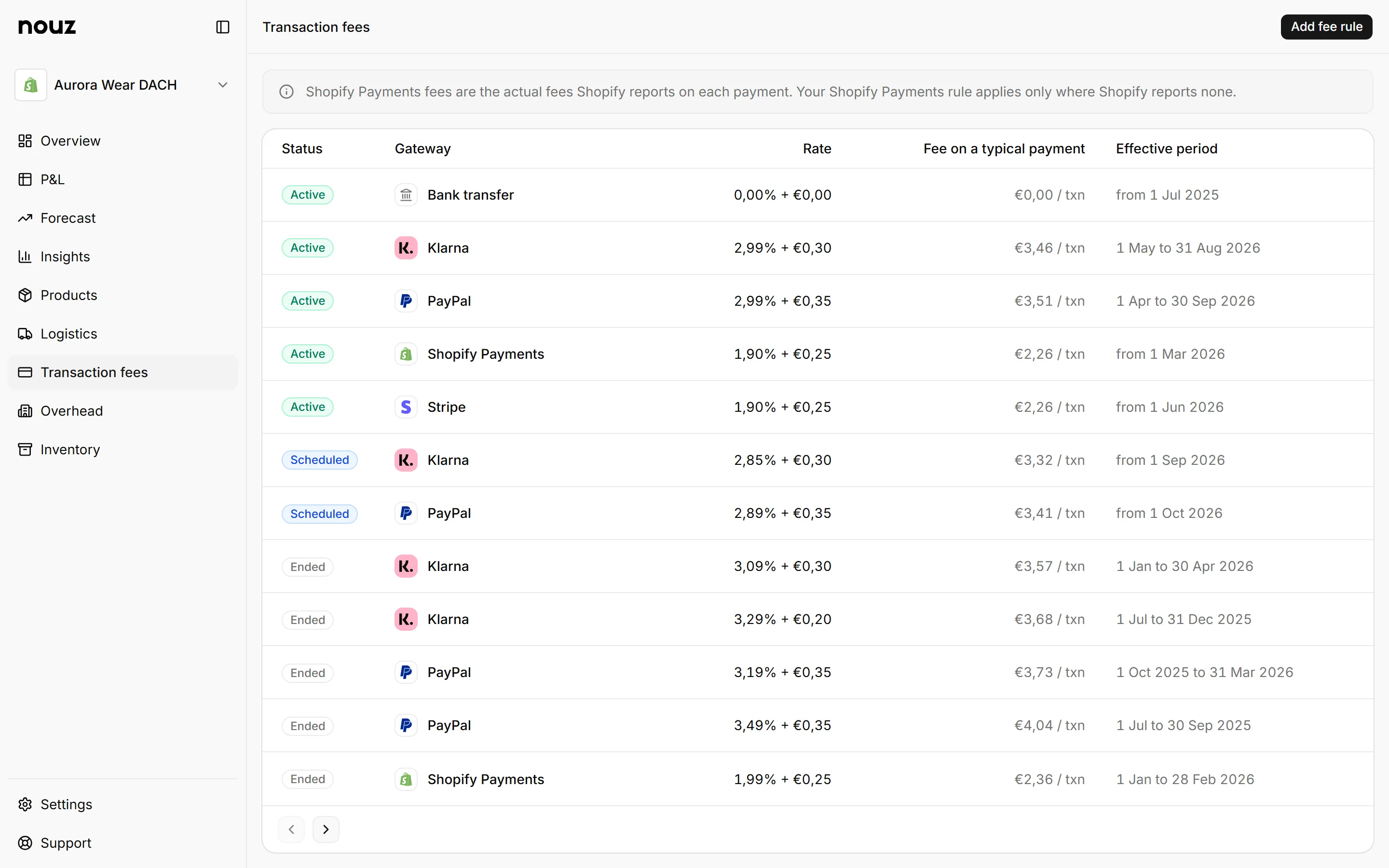
Set your transaction fees
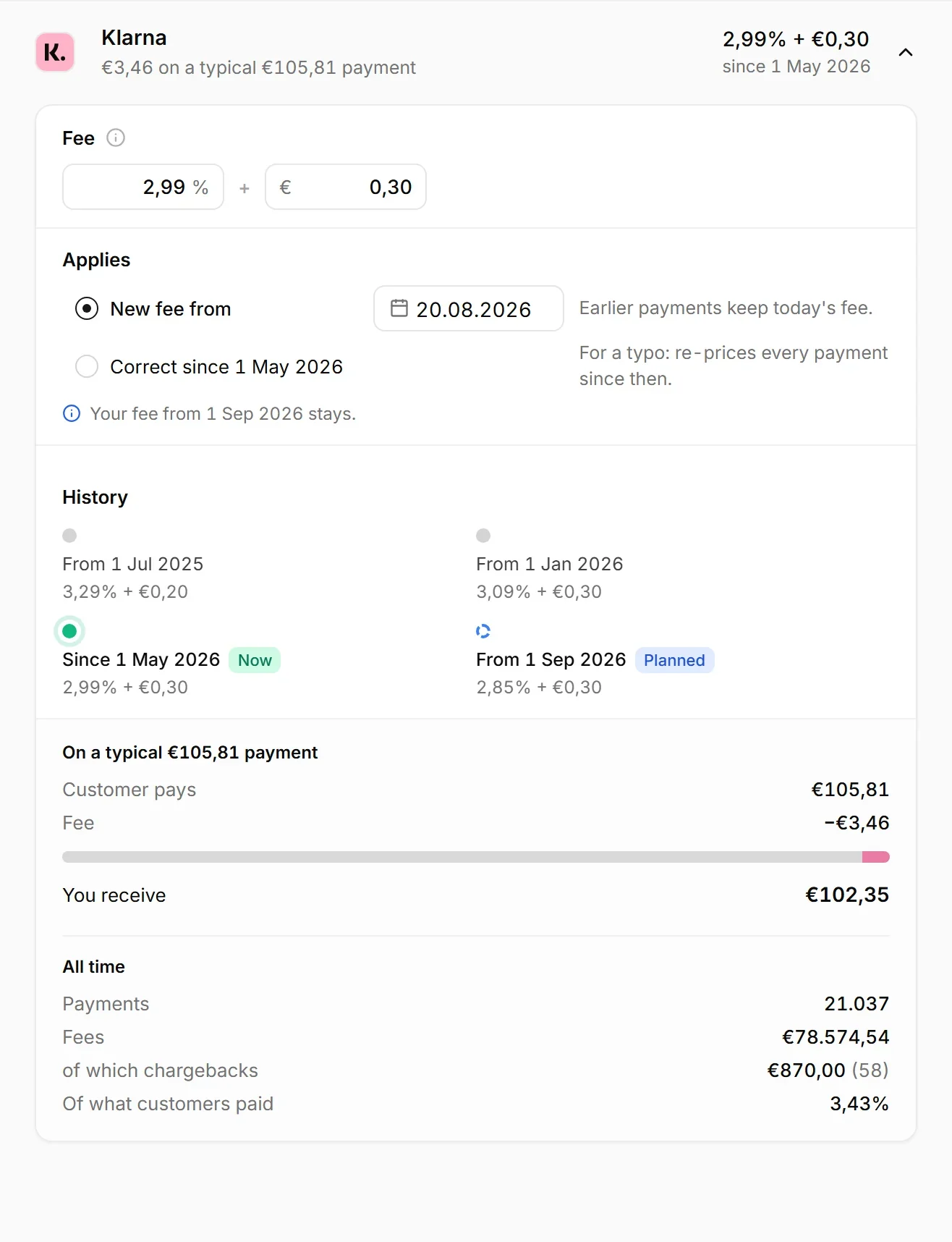
A percentage and a fixed fee per payment provider. An order paid half by card and half by Klarna is charged by both, at the right rate for each.
- 04
Set your logistics costs
Your carrier's rates by zone and weight, then picking, packing, packaging, returns handling and packaging EPR. A split shipment is two parcels and costs like two.
- 05
Read your P&L
Thirty-four lines from revenue down to what you kept, in any period you like. The lines that have parts open into exactly what made them.
- 06
Read your Insights
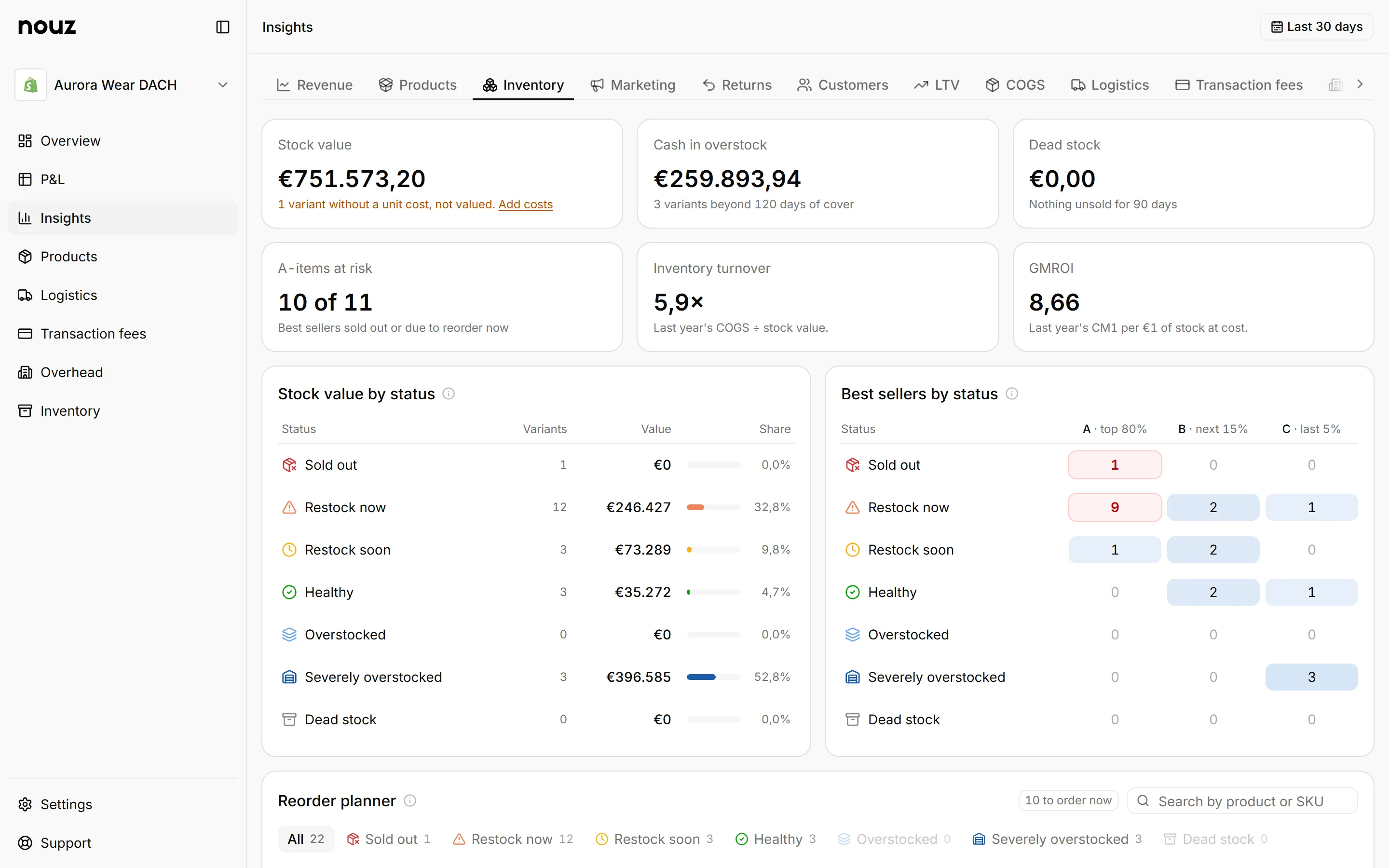
Nine tabs that read the same numbers a different way. Revenue opens on the bridge from GMV down to net revenue, every reduction on the way named and sized.
- 07
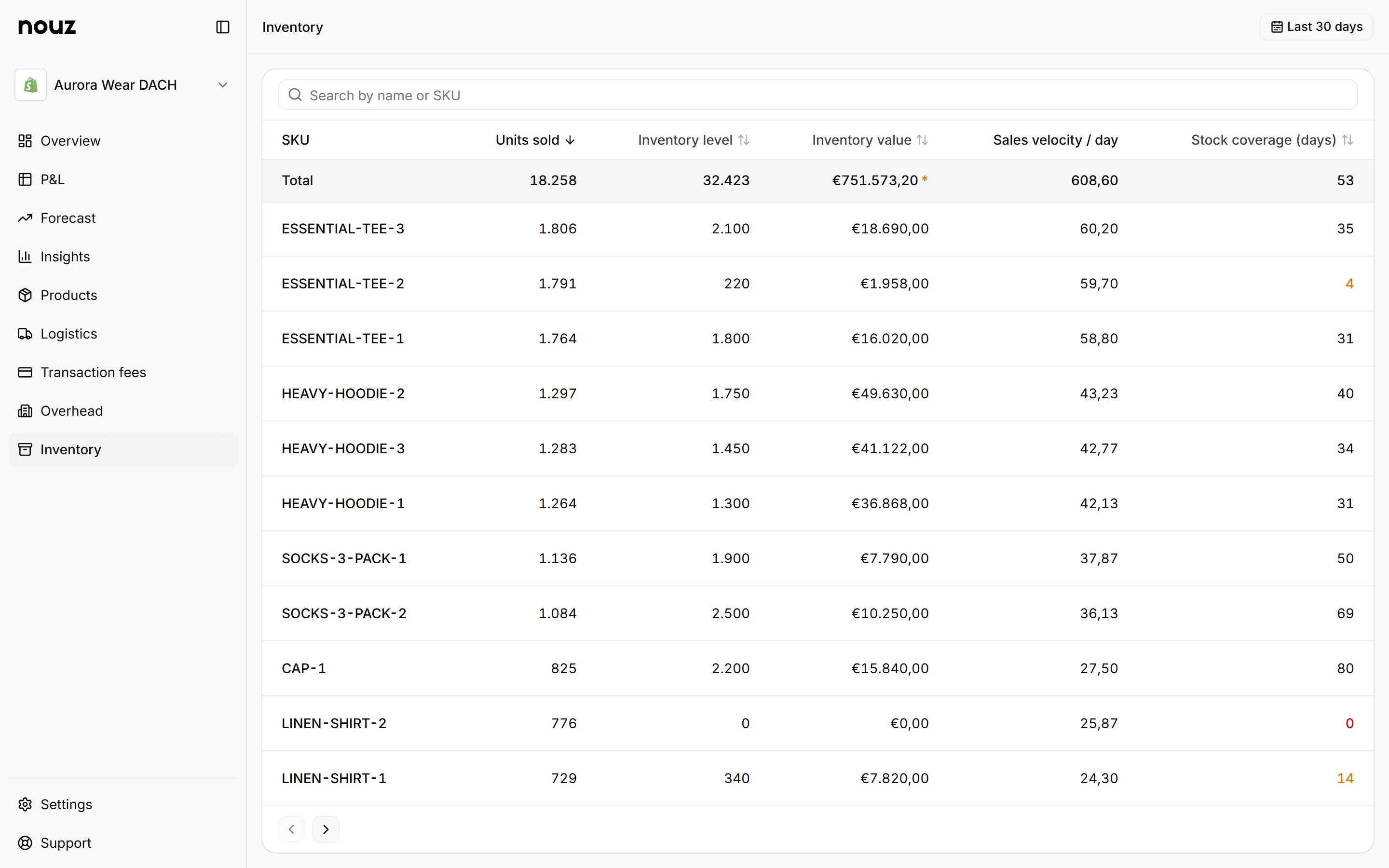
Check your inventory
Units sold, stock on hand and what that stock is worth at cost, per SKU. Stock with no unit cost is flagged rather than counted as free.
The P&L
The most detailed profit and loss statement a Shopify store can get.
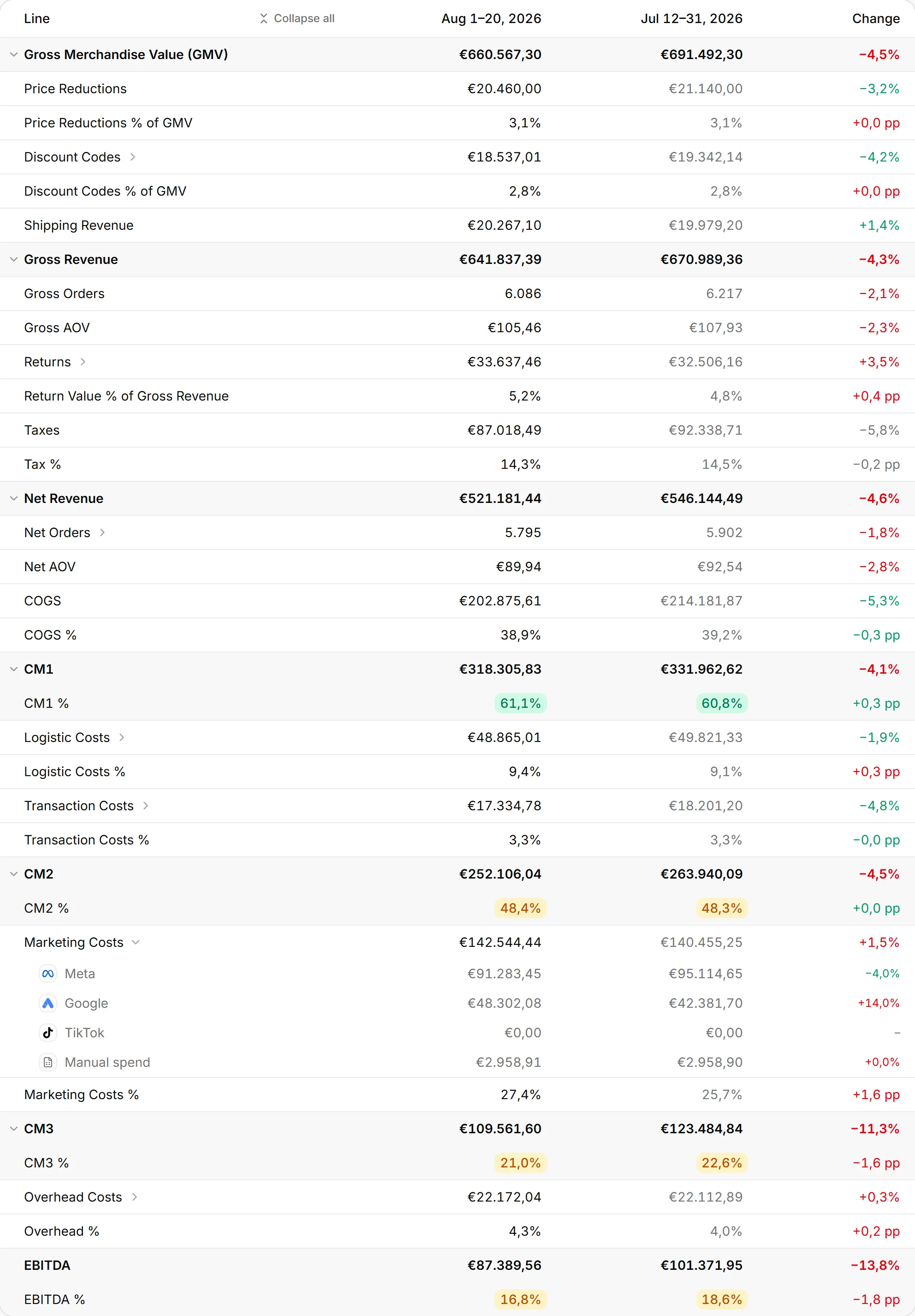
Thirty-four lines, from gross merchandise value down to EBITDA, with CM1, CM2 and CM3 on the way. Most profit tools give you a number and a chart. This is a statement an accountant would recognise, rebuilt from your own orders every night.
Four margins, not one number
CM1 after the goods, CM2 after fulfilment and payment fees, CM3 after advertising, EBITDA after the fixed bills. Each cost is named between the two margins it sits between, so when profit moves you can see which layer moved it.

Every line opens into its parts
Marketing Costs opens into Meta, Google, TikTok and anything entered by hand. Seven of the thirty-four lines open like this, and every breakdown adds up to the line above it to the cent. A platform you spent nothing on is still shown, at €0,00, rather than quietly left out.

Every euro on its own day
Revenue on the order date, refunds on the refund date, ad spend on the spend date. Switch the statement to daily and every line splits into the days that made it, so a refund in July never rewrites a May you have already reported on.

The cost engines
Every cost your business actually has. Not an average margin.
Most tools ask you for one number: your margin. One average makes every product look the same and every month look flat. nouz takes the eight costs that actually vary and applies them to every single order, at the rate that was true on that order's own date.
Priced per parcel, not per order
A split shipment is two parcels and is charged like two, each priced on the box it actually went out in. A pickup order skips the rate card. A return is charged on the day it was refunded, and the parcel that already went out is never credited back.

Every rule carries its date
Every rate you have ever charged keeps its own period. Change one today and today reprices, while yesterday keeps the rate that was true yesterday. A rise you already know about can be entered before it starts, and the version it replaces stays on the record.

Packaging EPR, per market
Euros per kilogram per material, by the country the parcel is delivered to. We work out the cost and the kilograms you have to declare. We never claim to file it for you, and a market you have not priced yet is flagged by name rather than quietly treated as free.

Insights
See what is actually going on. Then stop the bleeding.
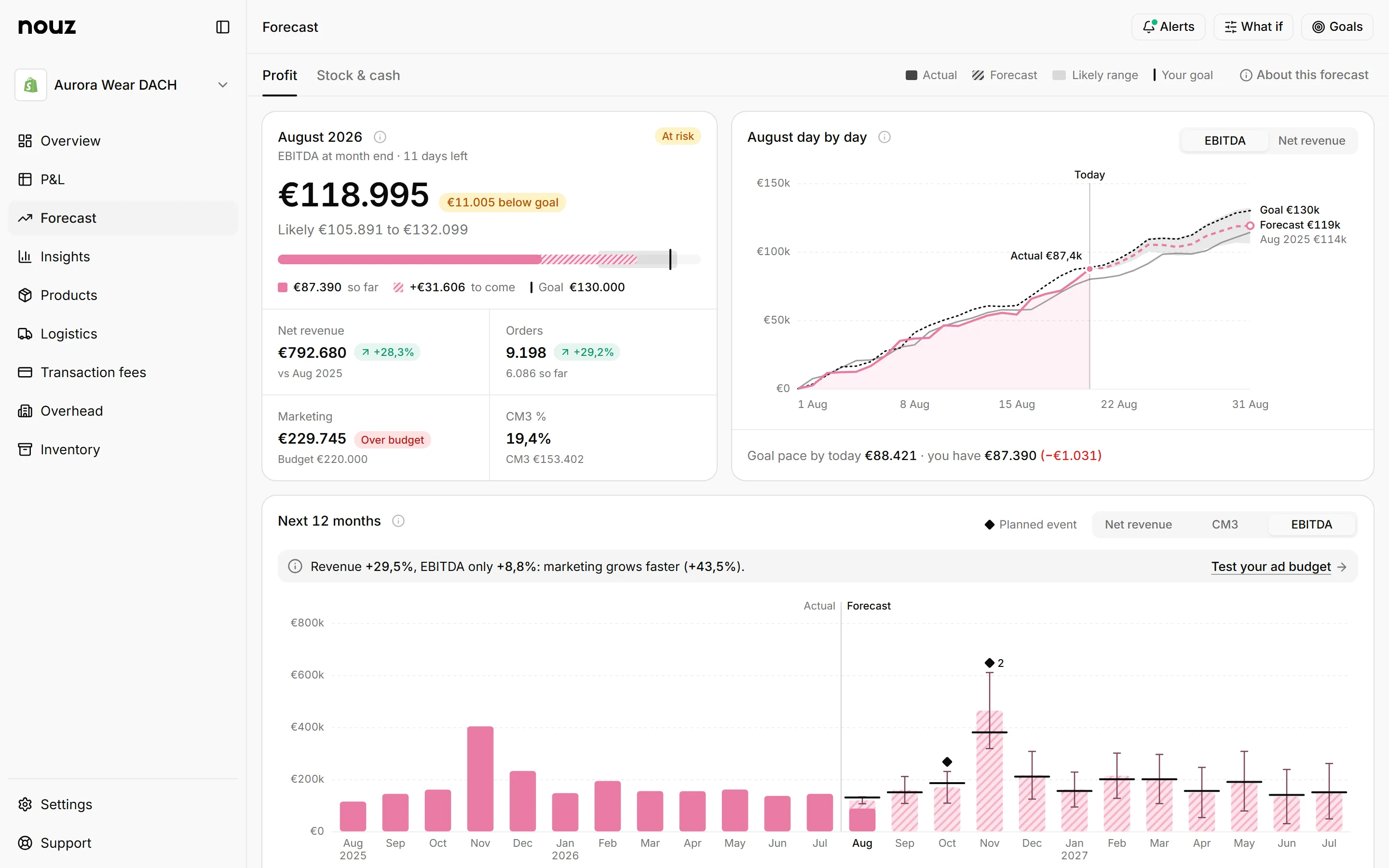
Thirty-two charts across nine tabs: revenue, products, marketing, returns, customers, and one for each cost engine. Which product is carrying the month and which one is quietly eating it. Where the margin went and what it went on.
Margin per product, not revenue per product
Each product carries its own discounts, its own return rate, its own weight on the rate card and its own cost of goods. So the page names the products that gained contribution margin this period and the ones that gave it back, with the units behind each move.

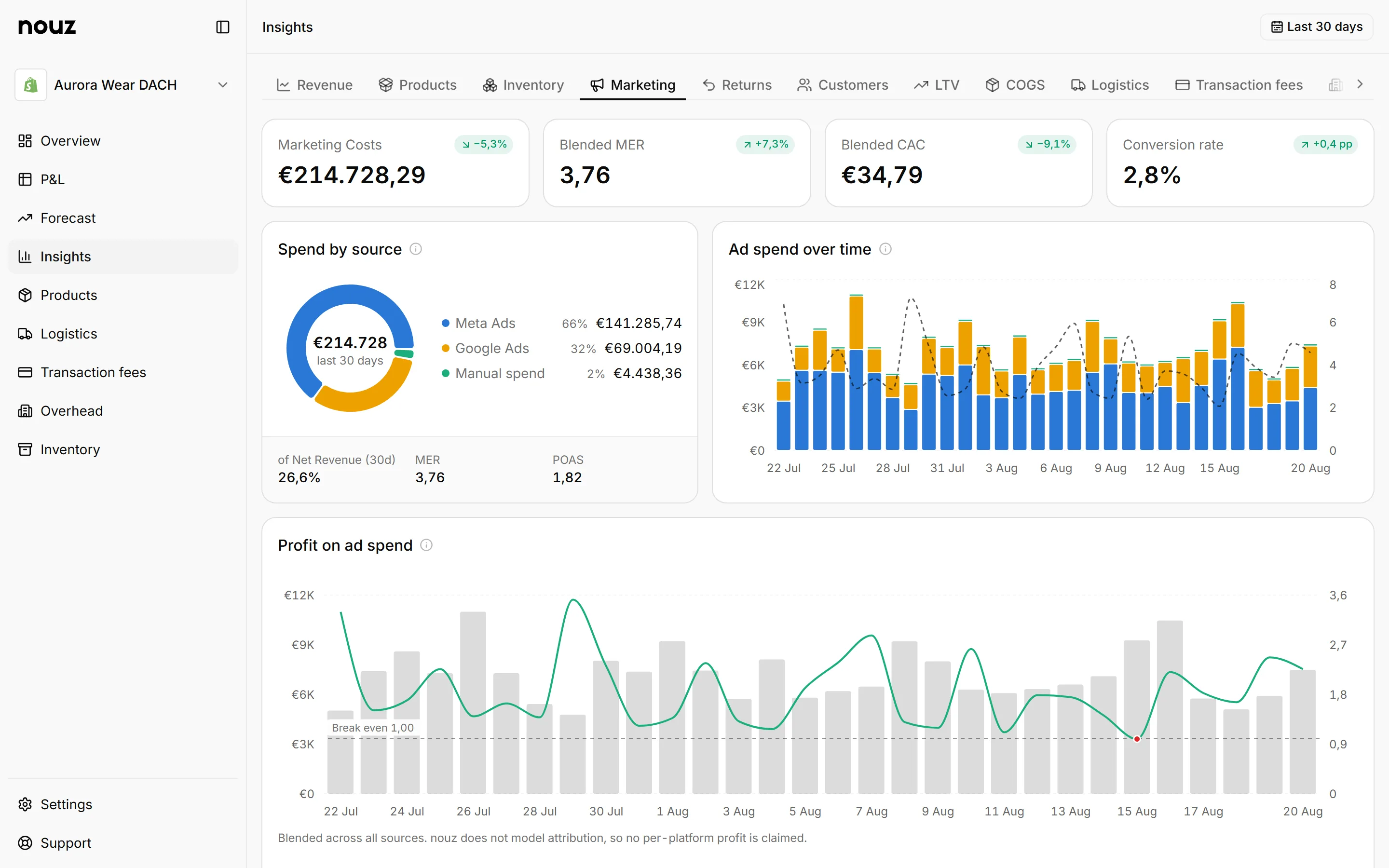
What a new customer actually costs
How many customers you won each month, and what each one cost you, blended across every platform you advertise on. MER and POAS sit beside it, both worked out from your own revenue and your own profit rather than from what each platform claims it earned you. No attribution modelling, and no pretending.

Returns priced properly
The margin you gave back, plus the processing on the way in, plus the outbound fulfilment and payment fees that are gone for good. That last part is what makes a return cost more than the refund did.

Everything your profit depends on. In one product.
Not a dashboard with a margin field. The statement, the four cost engines that price it, the reports that read it and the stock behind it, all built from the same orders.
Connects to everything your money already runs through
Read onlyReads
- ShopifyOrders, refunds, products
- MetaDaily spend per account
- GoogleDaily spend per account
- TikTokDaily spend per account
One click each, read only, and no code added to your storefront. The first sync brings your whole order history with it, and a sync every night keeps it current.
Prices
- Shopify Payments
- PayPal
- Klarna
- Stripe
A percentage and a fixed fee per gateway, per transaction, at the rate that was true on the day. Any other provider you take money through gets its own rule.
The whole statement, thirty-four lines deep
Example store, August 2026. Seven of the lines open into their own parts.
Nine tabs of analysis, all read from the same orders

Revenue, products, marketing, returns, customers and one tab for each cost engine. Every one of them reads the same synced orders, so no two tabs can disagree about a number.
Every SKU, what sold and what is still on the shelf

Valued at the unit cost that was in force, not at what it lists for, with days of cover beside it. Stock with no cost on it is shown as unknown, never as free.
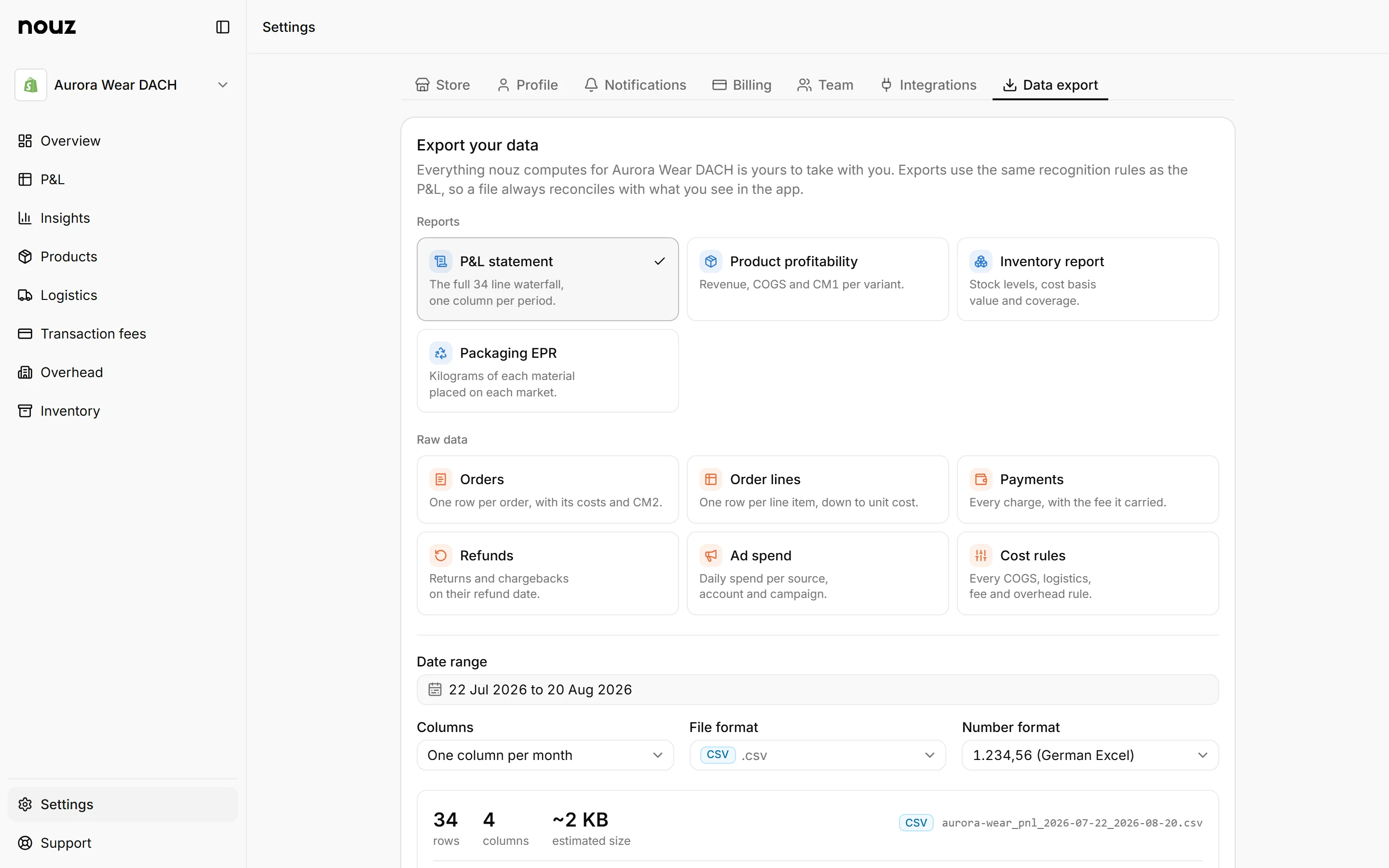
Ten exports, and the whole account in one archive

CSV, Excel or JSON, with a number format switch so one file opens correctly in German Excel and the next one loads into your BI tool.
Also included
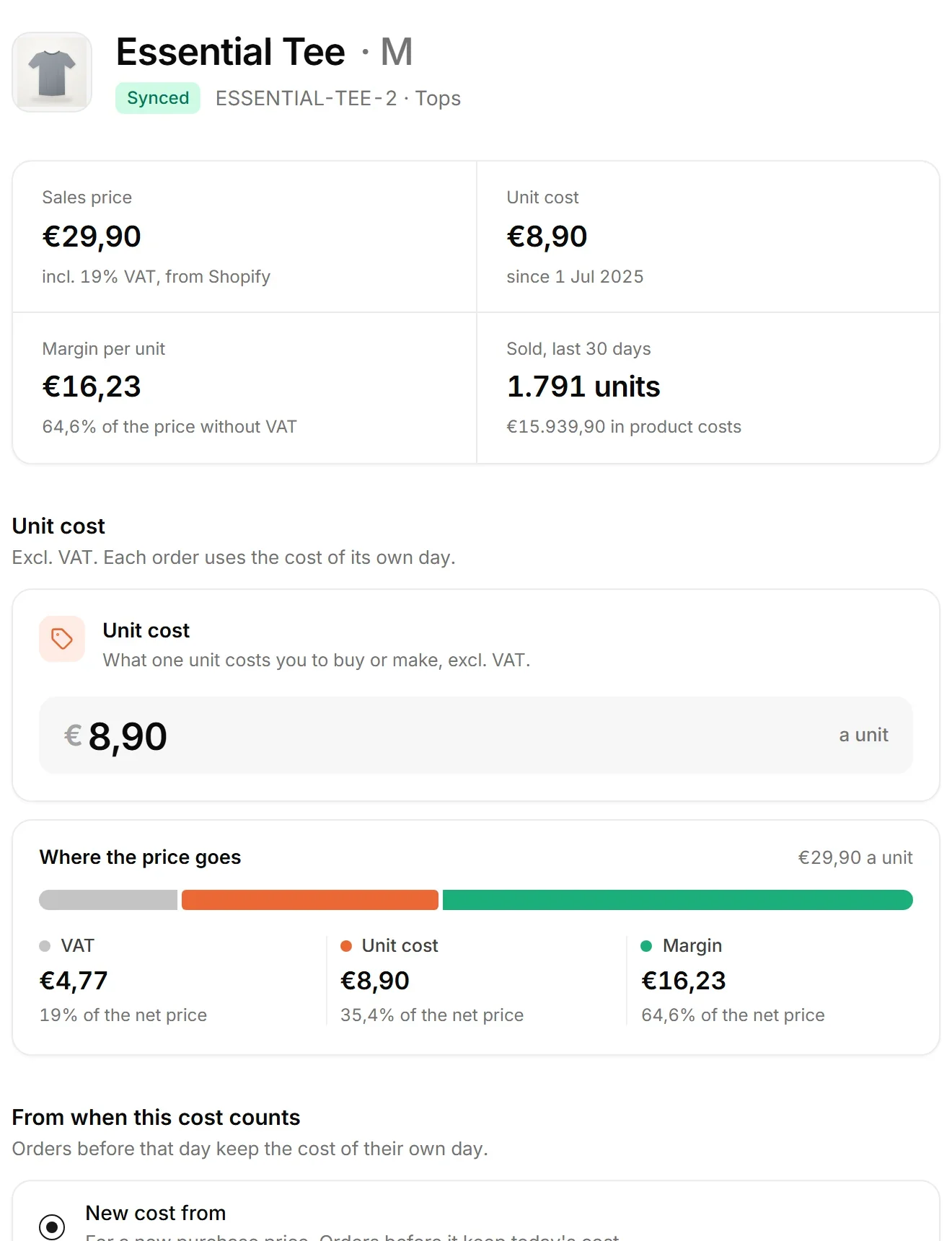
Four cost engines
Cost of goods per variant, logistics per parcel, payment fees per gateway, overhead per day.
Effective dating on every rule
A new price applies from its own date forward. A month you have already reported on never changes underneath you.
Packaging EPR
Euros per kilogram per material, by the country the parcel is delivered to, with the kilograms you have to declare.
Data health
Missing costs, missing weights and unzoned countries are named on the page that fixes them. A gap is never counted as a zero.
A sync every night
Your statement is rebuilt before you open it, and Sync now pulls everything since the last one whenever you want it.
Read only, always
nouz never writes to your store. No orders touched, no products changed, and no customer names or addresses stored.
Your data stays in the EU
Row level security between accounts, and third party tokens encrypted at rest.
One flat price
Base €69, Pro €99 or Scale €249 a month net, at any order volume. 14 days free, and you cancel in the app.
The short version
How do you track profit on a Shopify store?
You track profit on a Shopify store by putting every order against the costs it caused, on the day they belong to: goods, shipping, packaging, payment fees, ad spend, and a daily share of overhead. Shopify reports the revenue half. nouz adds the cost half and rebuilds the full 34-line statement every night.
Questions
Everything people ask before they sign up.
You type your .myshopify.com address, approve read-only access on Shopify's own screen, and you are back in nouz. There are no API keys to create, nothing to install in your theme and no code to paste. We pull your entire order history straight away, every order the store has ever taken, so your P&L has history from the first minute.
Orders, refunds, products, variants and payment transactions. That is what the P&L is built from. Access is read-only: nouz can never change a price, edit an order or touch a customer. We do not store customer names, addresses or email addresses at all, only Shopify's internal customer id, which is what tells new orders apart from repeat ones.
Shopify knows what came in. It does not know what your goods cost you, what your 3PL charges per parcel, what Klarna takes per transaction, or what you spent on Meta yesterday. nouz holds all four and puts them in the right place on the right day, so the bottom line is profit rather than revenue.
No. Shopify alone gives you lines 1 to 16 correctly, from GMV down to Net Revenue and Net AOV. Each cost you add unlocks the next margin: product costs give you CM1, logistics and payment fees give you CM2, ad spend gives you CM3, overhead gives you EBITDA. Anything still missing is flagged, never quietly treated as zero.
Every cost carries an effective-from date. Saving a new value applies it from that date forward and leaves every earlier day priced by the rule that was effective then, so last quarter's P&L does not silently rewrite itself. If you deliberately backdate a change, only the days from that date forward are recalculated.
Meta, Google and TikTok, each connected once and pulled in daily by spend date. Anything else, an influencer retainer, an affiliate payout, a platform we do not integrate, goes in by hand or by CSV and counts exactly the same in the P&L.
No, and that is deliberate. nouz puts no script on your storefront and makes no claim about which ad produced which order. What it gives you is blended truth: total spend against total profit, as MER, POAS and blended CAC. Numbers that cannot be inflated by an attribution window.
Yes. Everything down to the tax line is VAT inclusive, the way a European merchant reads their own shop, and Net Revenue and everything below it is VAT exclusive. Amounts are formatted the way you write them, 1.234,56, and dates day first.
In the EU, with row-level security so one store's data is unreachable from another account. Your Shopify and ad platform tokens are encrypted at rest and only ever decrypted server side at the moment of a call. The Privacy Policy names every processor we use and where each one holds data.
Any time, on every plan. Settings has a data export tab that hands you your full account as one archive, because portability is a right rather than a paid feature. Pro adds individual exports of the P&L, products, inventory, orders, order lines, payments, refunds, ad spend, cost rules and packaging EPR volumes, as CSV, Excel or JSON.
nouz computes the cost, and only the cost. Packaging EPR is the fifth component of the logistics engine: you enter your own rate per kilogram per material from your own scheme contract, and every parcel is priced on the composition of the box it went in and the country it was delivered to. There is no rate table, because Germany's dual systems quote privately and rates are revised annually. nouz does not register you, does not file your declaration and never tells you what you owe, and none of it is legal advice.
Three plans, all net of VAT and all monthly: Base 69 euro, Pro 99 euro and Scale 249 euro a month, with 14 days free on every one. No order tiers, no revenue percentage, no overage, so a record month costs the same as a quiet one. You cancel in the app and keep access to the end of the period you paid for.
On Pro, yes: up to five stores and up to five team members, with Owner, Admin and Analyst roles, and store switching without logging out. Scale doubles both, to ten stores and ten team members. Each store keeps its own costs, its own rules and its own P&L, because a rate card that is right for one store is rarely right for another. Base covers one store and one person.
Yes, as long as you sell in one currency. nouz is built EU first, with European VAT logic and European number formatting, and works for any Shopify store trading in a single shop currency. Multi-currency consolidation is not in this version.
Start free
Your first P&L is one sync away.
Built from your own orders, not a sample store. The first statement you read is already yours.
14 days free, nothing charged during them, then from €69,00 net a month. No order tiers, no overage, and you cancel in the app.